Categories
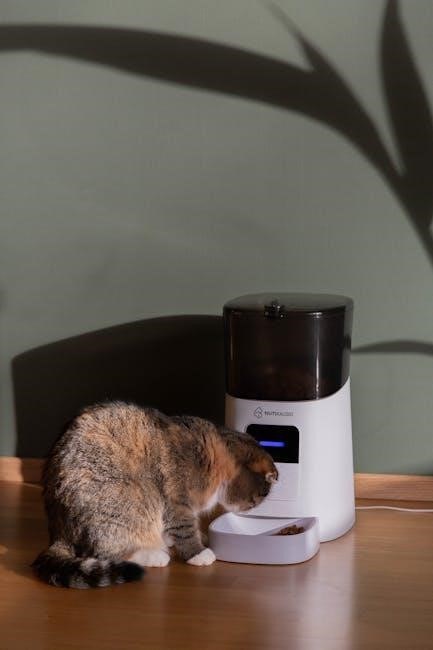
Welcome! This manual provides detailed instructions for setting up, using, and maintaining your Voluas Pet Feeder, ensuring a seamless feeding experience for your beloved companion;
The Voluas Pet Feeder is a revolutionary smart device designed to simplify pet feeding and provide peace of mind for pet owners․ We understand that maintaining a consistent feeding schedule can be challenging with busy lifestyles, travel, or unexpected delays․
This automated feeder allows you to remotely control portion sizes and meal times, ensuring your furry friend receives the nourishment they need, precisely when they need it․
Beyond convenience, the Voluas Feeder promotes healthier eating habits by preventing overfeeding and supporting portion control․ Its user-friendly design and intuitive mobile app make managing your pet’s diet effortless․
Whether you have a cat or a dog, the Voluas Feeder adapts to their specific needs, offering a reliable and customizable feeding solution․ Prepare to experience a new level of convenience and control over your pet’s well-being!
Before you begin, please verify that all components are present․ Your Voluas Pet Feeder package should contain the following items:
Optional Accessories: Some bundles may include extra accessories like a backup power supply or additional food bowls․
If any items are missing or appear damaged, please contact Voluas Customer Support immediately for assistance․ Retain the original packaging for potential returns or warranty claims․ We want to ensure a smooth unboxing experience!
Let’s get started! Follow these simple steps to quickly and efficiently set up your Voluas Pet Feeder for optimal performance and convenience․
First Power-On: Carefully unpack your Voluas Feeder and place it on a stable, level surface near a power outlet․ Connect the provided power adapter to the feeder and then plug it into the outlet․ You’ll notice the feeder briefly initializes – this is normal! The LCD screen will illuminate, displaying the Voluas logo and then prompting you to begin the initial configuration․
Date & Time Setting: The first step is setting the correct date and time․ Use the ‘Up’ and ‘Down’ buttons on the feeder’s control panel to navigate and adjust the values․ Press the ‘Select’ button to confirm each setting․ Accurate date and time are crucial for scheduling accurate meal times․
Wi-Fi Indicator: Observe the Wi-Fi indicator light․ It will blink slowly, indicating the feeder is ready to connect to your home Wi-Fi network․ Do not attempt Wi-Fi connection until prompted by the Voluas app during the next stage․
Download & Installation: Begin by downloading the “Voluas” app from the Apple App Store (iOS) or Google Play Store (Android)․ Once downloaded, install the app on your smartphone or tablet․ Ensure your device’s Bluetooth is enabled, as this assists in the initial device discovery process․
App Launch & Device Pairing: Launch the Voluas app and follow the on-screen instructions․ The app will automatically search for nearby Voluas feeders․ Select your feeder from the list of available devices․ You may be prompted to press a button on the feeder itself to confirm pairing․
Wi-Fi Setup within the App: The app will then guide you through connecting the feeder to your home Wi-Fi network․ Enter your Wi-Fi network name and password when prompted․ A successful connection will be indicated by a solid Wi-Fi indicator light on the feeder․
Account Creation Process: After successfully connecting your Voluas Feeder to the app, you’ll be prompted to create a Voluas account․ This account allows you to remotely control your feeder, save feeding schedules, and access advanced features․
Required Information: You will need to provide a valid email address and create a secure password․ We recommend using a unique password that you don’t use for other online accounts․ You may also be asked to provide your pet’s name and breed – this information helps personalize your experience․
Verification & Profile Completion: A verification email will be sent to the address you provided․ Click the link in the email to verify your account․ Once verified, you can complete your profile by adding additional details about your pet and your preferences within the app settings․

Explore capabilities! Discover precise portion control, flexible scheduling, and convenient remote feeding – all designed to simplify pet mealtime and enhance wellbeing․
Precise Feeding: The Voluas Feeder excels at delivering consistent and accurate portions, ranging from approximately 1/8 cup to 4 cups per meal․ This ensures your pet receives the optimal amount of food, supporting a healthy weight and preventing overeating․ Adjust portion sizes easily through the Voluas app․
Dry Food Focus: This feeder is specifically designed for use with dry kibble of various shapes and sizes․ The dispensing mechanism functions most effectively with consistently sized, dry food pieces․
Food Size Matters: While versatile, extremely small kibble or large, irregularly shaped pieces may occasionally cause dispensing inconsistencies․ We recommend testing a small amount of your pet’s food to confirm reliable operation;
Not for Wet Food: Do not use wet, canned, or semi-moist food in the Voluas Feeder․ These food types will clog the dispenser and potentially damage the unit․ Maintaining proper food type is crucial for optimal performance․
Effortless Scheduling: Within the Voluas app, navigate to the “Schedule” section․ Here, you can create customized feeding schedules tailored to your pet’s needs․ Tap the “+” icon to add a new meal time․
Setting the Details: Input the desired time (hour and minute) for the meal․ Select the portion size using the intuitive slider or by manually entering the amount in cups․ Choose which days of the week the meal should be dispensed․
Repeat & Review: Repeat these steps to add multiple meal times throughout the day․ Carefully review your schedule to ensure accuracy․ You can easily edit or delete existing meal times by tapping on them within the schedule list․
Save & Activate: Once satisfied, save your schedule․ The Voluas Feeder will automatically dispense meals according to your programmed settings, providing consistent and reliable feeding․
Feed From Anywhere: The Voluas app allows you to remotely dispense meals to your pet, regardless of your location, provided you have an internet connection․ This feature is perfect for unexpected schedule changes or when you’re away from home․
Manual Dispense Option: Within the app’s main screen, you’ll find a “Feed Now” button․ Tapping this button will immediately dispense one pre-defined portion of food․ You can adjust the default portion size in the settings menu․
Real-Time Confirmation: After initiating a remote feeding, the app provides real-time confirmation that the meal has been dispensed․ You’ll receive a notification on your smartphone, ensuring peace of mind․
Stay Connected: Remote feeding empowers you to maintain your pet’s feeding routine, even when life gets busy, fostering a consistent and healthy diet for your furry friend․
Unlock Potential: Explore personalized feeding strategies with multiple pet profiles, slow feed mode, and customizable voice recordings for enhanced pet care․
Catering to Individual Needs: The Voluas Feeder excels at managing mealtimes for households with multiple furry friends․ Each pet can have a dedicated profile within the Voluas app, allowing you to precisely tailor portion sizes and feeding schedules to their specific dietary requirements and activity levels․
Creating & Managing Profiles: To add a new pet profile, simply navigate to the “Pets” section in the app and select “Add Pet․” You’ll be prompted to enter your pet’s name, breed, weight, and any specific feeding instructions․ You can even upload a cute photo! Once created, you can assign specific meal schedules and portion controls to each profile․
Seamless Switching: The feeder intelligently recognizes which pet profile is active during scheduled feeding times․ This ensures that each animal receives the correct amount of food, preventing overeating or underfeeding․ Easily switch between profiles manually through the app if needed, for unexpected feeding adjustments or temporary care arrangements․
Addressing Mealtime Guzzlers: Does your pet inhale their food, potentially leading to indigestion, bloating, or even vomiting? The Voluas Feeder’s Slow Feed Mode is designed to combat this common issue by dispensing food in smaller portions over a longer period․ This encourages mindful eating and promotes better digestion․
How it Works: When activated, Slow Feed Mode divides the scheduled meal portion into multiple mini-meals, released at intervals throughout the designated feeding time․ You can customize the duration of the slow feed cycle within the app, tailoring it to your pet’s individual needs․
Benefits & Considerations: This feature is particularly beneficial for pets prone to rapid eating or those with sensitive stomachs․ Monitor your pet’s response to Slow Feed Mode and adjust the settings accordingly․ It’s a fantastic way to improve their overall health and well-being during mealtimes!
Personalized Mealtime Experience: Enhance your pet’s feeding routine with the Voluas Feeder’s Voice Recording feature! This allows you to record a custom audio message that plays just before each scheduled meal, creating a comforting and familiar experience, even when you’re away․
How to Record: Access the Voice Recording function within the Voluas app․ Simply tap the record button and speak a short, reassuring message – perhaps your pet’s name or a friendly “Dinner time!”․ Save the recording, and it will automatically play during each feeding․
Benefits & Tips: This feature is especially helpful for pets who experience separation anxiety or those who respond well to auditory cues․ Keep the message short and positive․ Regularly update the recording to maintain its novelty and effectiveness, ensuring a happy and stress-free mealtime for your furry friend!
Keep it Clean! Regular cleaning and prompt troubleshooting are vital for optimal performance and longevity of your Voluas Pet Feeder, ensuring happy pets․
Maintaining Hygiene: To ensure your pet receives fresh food and to prevent bacterial growth, regular cleaning of the food hopper and dispenser is crucial․ We recommend a thorough cleaning at least once a week, or more frequently if you notice any food buildup․
Step-by-Step Guide: First, disconnect the power adapter․ Remove the food hopper from the feeder base․ Disassemble the dispenser mechanism according to the diagrams in the ‘Parts Identification’ section․ Wash all removable parts with warm, soapy water․ Avoid harsh chemicals or abrasive cleaners․
Drying & Reassembly: Ensure all parts are completely dry before reassembling․ A damp environment can lead to food clumping․ Carefully reassemble the dispenser mechanism and place the hopper back onto the feeder base․ Wipe down the exterior of the feeder with a damp cloth․
Important Note: Never submerge the feeder base in water․ This could damage the electronic components․
Maintaining Food Freshness: The desiccant pack within the food hopper absorbs moisture, keeping your pet’s food dry and preventing spoilage․ Over time, the desiccant pack becomes saturated and loses its effectiveness․ We recommend replacing it every 1-3 months, depending on humidity levels in your environment․
Locating & Replacing: To access the desiccant pack, remove the food hopper from the feeder base․ The pack is typically located in a small compartment within the hopper lid or base․ Carefully remove the old desiccant pack – avoid inhaling any silica gel․
Using a New Pack: Insert a new, unused desiccant pack into the compartment․ Ensure it’s securely placed․ Do not reuse old desiccant packs, as they are no longer effective․ Properly dispose of the used pack according to local regulations․
Important Reminder: Keep desiccant packs out of reach of children and pets, as they pose a choking hazard․
Problem: If your Voluas Feeder isn’t dispensing food, several factors could be at play․ First, check the food level in the hopper – ensure it’s not empty! Next, verify the scheduled feeding times within the Voluas app; a missed schedule won’t trigger dispensing․
Mechanical Checks: Inspect the dispenser mechanism for obstructions․ Gently remove the hopper and check for jammed kibble pieces․ Ensure the rotating impeller isn’t blocked․ Power Cycle: Try unplugging the feeder for 30 seconds, then plugging it back in to reset the system․
App Connectivity: Confirm the feeder is connected to your Wi-Fi network and that the app is synchronized․ If issues persist, contact Voluas Support for further assistance․ Do not attempt to disassemble the feeder beyond the hopper removal․
Important: Always supervise initial feedings․ Keep the power cord secure, and never modify the device․ Prioritize pet safety during operation․
Caution: Only use the provided Voluas power adapter with your pet feeder․ Using a different adapter may damage the device and void your warranty․ Ensure the power adapter is securely plugged into both the feeder and a functioning wall outlet․ Regularly inspect the power cord for any signs of damage, such as fraying or exposed wires․
If damage is detected, immediately discontinue use and contact Voluas Customer Support for a replacement․ Avoid placing the power adapter in areas prone to moisture or extreme temperatures․ Do not attempt to disassemble or repair the power adapter yourself; this could result in electric shock or fire hazard․ Keep the power adapter out of reach of pets to prevent chewing or accidental disconnection․ Always unplug the feeder before cleaning or performing any maintenance․
Maintaining Food Freshness: To ensure your pet receives the highest quality nutrition, proper food storage is crucial․ Always store pet food in a cool, dry place, away from direct sunlight and moisture․ Keep the food container tightly sealed to prevent spoilage and pest infestation․ Regularly check the expiration date on the food packaging and discard any expired food․
The Voluas feeder’s hopper is designed to protect food from ambient humidity, but utilizing the included desiccant pack further enhances freshness․ Avoid transferring food into unmarked containers, as this can lead to confusion and potential errors in feeding․ Clean the food hopper regularly to remove any food residue and maintain hygiene․ Do not store medications or supplements alongside pet food․
Protecting the Feeder: While the Voluas Feeder is designed with durability in mind, preventing your pet from attempting to dismantle or excessively interact with it is essential․ Position the feeder in a location inaccessible to determined climbers or jumpers․ Consider securing it to a stable surface if necessary․
Discourage pawing or batting at the feeder, as this could damage the dispensing mechanism or cause inaccurate portions․ If your pet exhibits persistent disruptive behavior, consider using a pet-safe barrier or distraction techniques during feeding times․ Regularly inspect the feeder for any signs of tampering or damage․ Never allow your pet to free-feed from the hopper; always rely on scheduled dispensing․
Find Answers Here! This section addresses common questions about your Voluas Feeder, providing quick solutions and clarifying operational aspects for optimal performance․
Unfortunately, no․ The Voluas Pet Feeder is specifically designed for use with dry kibble only․ Its mechanism relies on a rotating dispenser and gravity-fed system, which are not suitable for the consistency of wet food․ Wet food is prone to sticking, clogging the dispenser, and potentially causing malfunctions within the feeder․
Attempting to use wet food could lead to inconsistent portion sizes, hygiene issues, and damage to the device, voiding your warranty․ We strongly recommend sticking to dry kibble to ensure the longevity and proper functioning of your Voluas Feeder․
If you require automated feeding for wet food, we suggest exploring alternative automatic pet feeders specifically engineered for that purpose․ These feeders typically utilize different dispensing methods better suited for wet food’s texture․
The Voluas Feeder is equipped with a battery backup system! In the event of a power outage, the feeder will automatically switch to battery power, allowing it to continue dispensing meals according to the pre-programmed schedule․ The battery can typically power the feeder for up to 48 hours, depending on usage and battery age․
However, please note that any scheduled feedings during the power outage will be maintained, but any schedule adjustments made via the app while the power is out will not be saved until power is restored․ Once power is resumed, the feeder will automatically revert to normal operation and synchronize with the app․
We recommend regularly checking the battery status within the Voluas app to ensure it’s adequately charged for emergency situations․
Resetting your Voluas Feeder will erase all personalized settings, including Wi-Fi connections, feeding schedules, and pet profiles, returning it to its original out-of-the-box state․ To initiate a factory reset, locate the small reset button on the underside of the feeder – you may need a paperclip or similar tool․
With the feeder powered on, press and hold the reset button for approximately 10-15 seconds․ You’ll know the reset is successful when the indicator light begins to flash rapidly․ After the reset, you’ll need to re-connect the feeder to your Wi-Fi network and re-configure all settings through the Voluas app․
Caution: This process is irreversible․ Ensure you understand the implications before proceeding with a factory reset․

Your Voluas Feeder is covered by a one-year limited warranty against manufacturing defects․ For support, visit our website or contact our dedicated customer service team․
Our commitment to quality means your Voluas Pet Feeder is protected against defects in materials and workmanship for a period of one year from the original date of purchase․ This warranty covers normal residential use․ It does not cover damage resulting from misuse, abuse, accidents, unauthorized modifications, or natural disasters․
To make a warranty claim, please retain your proof of purchase and contact Voluas Customer Support (details below)․ We may request photos or videos of the defect to assess the claim․ If a valid claim is approved, Voluas will, at its discretion, repair or replace the defective product free of charge․
This warranty is non-transferable and applies only to the original purchaser․ Any attempted repair by unauthorized parties will void this warranty․ Accessories, such as power adapters, are covered for a period of 90 days․ This warranty gives you specific legal rights, and you may have other rights which vary by location․
We’re here to help! If you encounter any issues with your Voluas Pet Feeder, or have questions not addressed in this manual, our dedicated Customer Support team is ready to assist․ You can reach us through several convenient channels:
Email: support@voluaspet․com – Please allow up to 24-48 hours for a response․ Include your order number and a detailed description of the problem․
Phone: 1-800-VOLUAS-1 (1-800-865-8271) – Our phone lines are open Monday-Friday, 9 AM to 5 PM EST․
Online Support Portal: Visit our website at www․voluaspet․com/support for FAQs, troubleshooting guides, and the ability to submit a support ticket․ We also offer live chat during business hours․ Before contacting us, please check our online resources – your answer may be just a click away!